That moment, exactly.
This device's clock · demo
Your phone, the server of the site you're using, and standard time each drift by tens to hundreds of milliseconds. N Trigger measures that gap to show the true on-the-dot time — and taps the screen for you at the exact moment you set.
Same “now”,
three different clocks.
A sign-up opens on the dot of that site's server clock — not your phone's. N Trigger measures the gap between the server and your phone and lines you up with the server's on-the-dot.
Gaps shown are examples. Scroll to sync them.
Wake early, arm,
tap once.
Drop a target on the spot to tap, and the app taps it at the target moment (Android · PC). Class registration, first-come coupons, game events — whatever app you use.
Wakes the device and service ahead of time. Your schedule holds even if you leave the app.
Prepares the spot, press duration and order.
Taps the spot on the corrected dot. Measured error: 1–18µs.
Even if something slips, it taps once — never twice.
Time left is the star.
The start button lives only on the Timer tab, and orange appears only when it matters. (Screens are in Korean.)
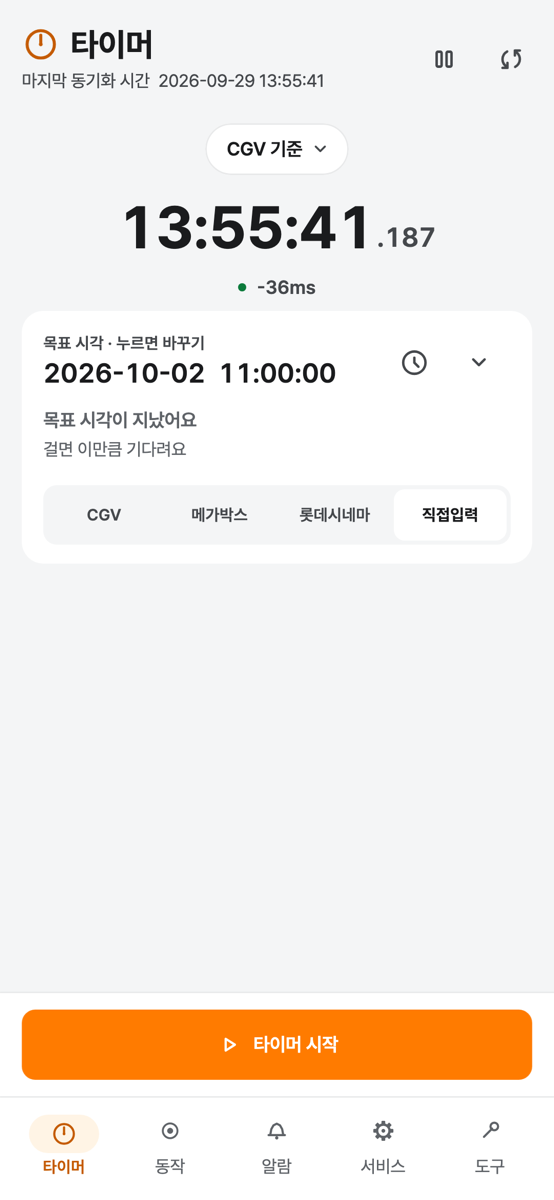
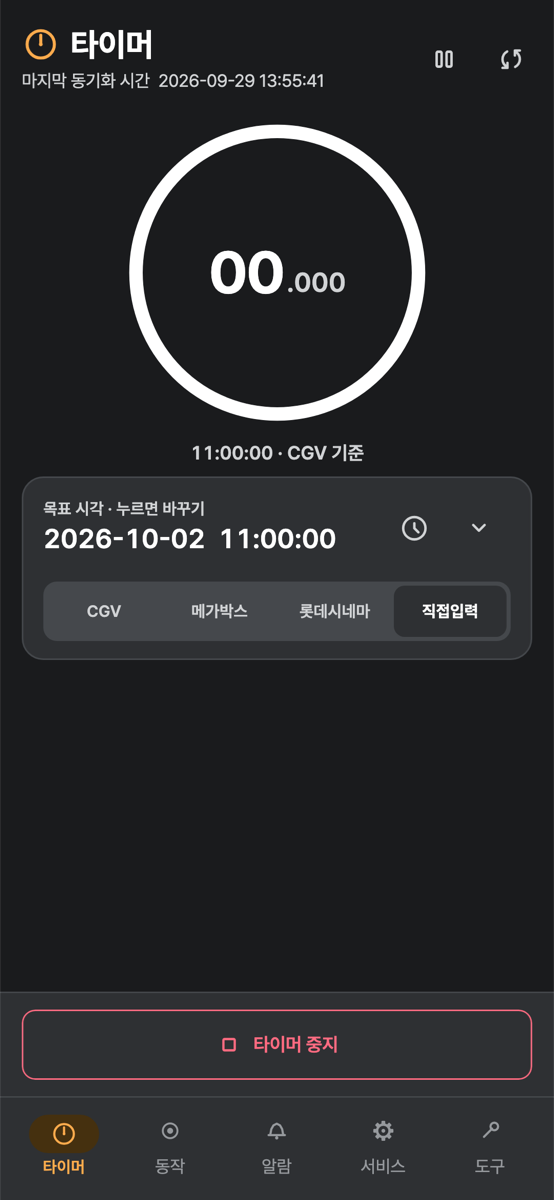
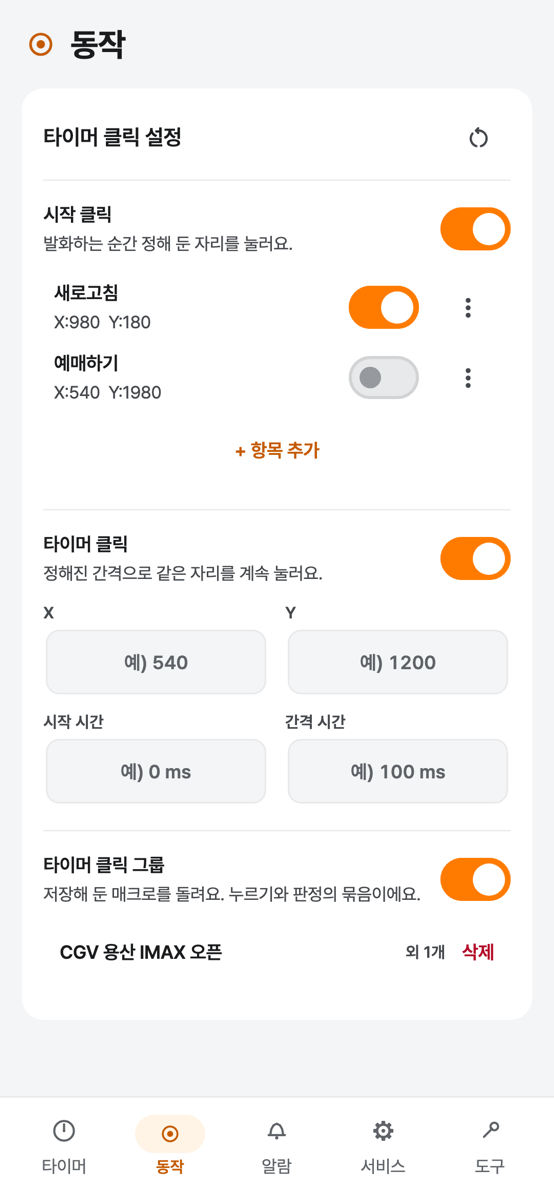
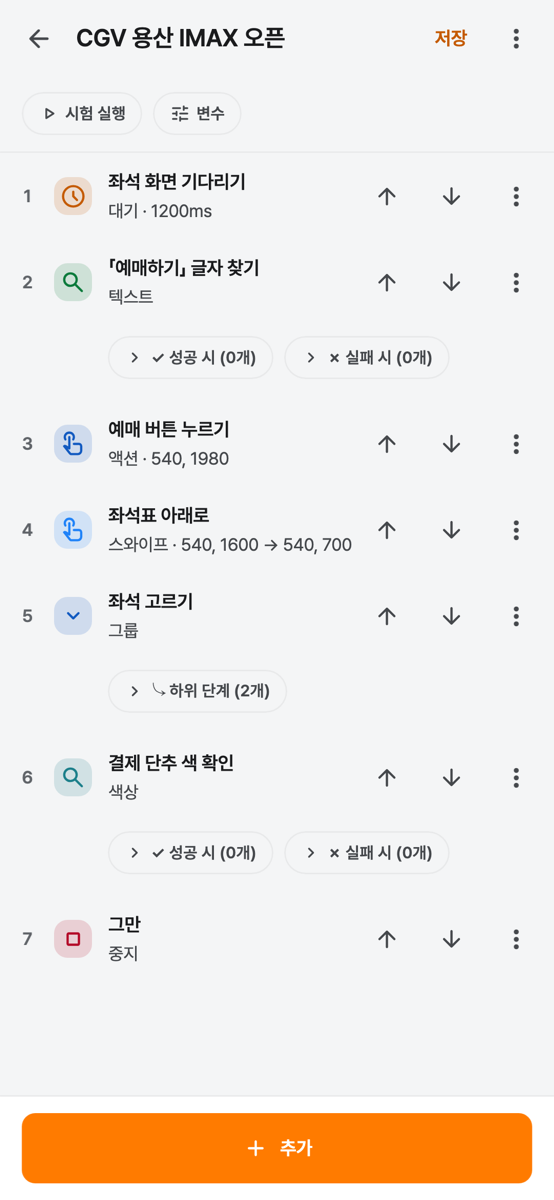
For moments decided by a second.
First-come sign-ups, coupon drops, class registration, game events — never late, never early.
Time left, over any app
A floating countdown stays on top of the app you're using, and taps the spot at zero. Shape, position, size and color are up to you.
Alarms
Sound, vibration, snooze, push. Wakes the lock screen; multiple alarms ring in turn.
 N Trigger · Alarm
Macros that tap what they see
Tap, swipe and wait, plus finding images, text and colors on screen, with conditions, loops and variables. Build and test right on top of the target app (Android).
Even with the screen off
Holds your schedule when the app is in the background, and comes back after a reboot or clock change.
What works where
iPhone apps can't tap other apps (Apple policy). On iPhone, use it as a precise clock, countdown and alarm.
| Feature | Android | iPhone · iPad | PC |
|---|---|---|---|
| Reference clock · countdown · alarms | Yes | Yes | Yes |
| Tap at the moment · macros | Yes | No | Yes |
| On-screen image · text · color checks | Yes | No | No |
| Floating timer · service settings | Yes | — | Partly |
How many ms
is a human finger off?
Press the button the instant the ring hits zero. It comes around every 10 seconds. However fast your finger is, it's off by tens of milliseconds — when N Trigger taps for you, we measured 1–18µs.
This demo counts with this device's clock. The app counts with a time corrected against standard time or the site's server.
Aim for the instant it hits zero.
Asks only the time.
Screens stay on-device.
No sign-up, no analytics or ad SDKs. Macros, alarms, settings and screen captures are handled on this device only.
There's no sign-up. Web login info stays on the device and is left out of backups.
Screens captured for image, text and color checks are processed on the device and sent nowhere.
Standard-time and site servers are only asked what time it is. No personal data is included.
Web requests you put in your macros, and diagnostics from the text-recognition tool (Google ML Kit). The Privacy Policy lists the addresses.
Tapping for you works only as you set it, on your own device. Check that the app or site you use allows automation, and follow the relevant laws and that service's terms. Terms of Use
Three permissions and you're set.
On first launch, a “Before you start” guide walks you through them. Later: Tools tab → Permission check.
To show time left and controls on top of the app you use.
The only way an app can actually tap the screen. Turn on N Trigger in Settings → Accessibility.
So it's never late for the moment you set.
FAQ
How accurate is it?
It usually measures the gap to standard time or a site's server within ±1–2ms, and the tap at the scheduled moment was measured at 1–18µs (0.001–0.018ms). Results still depend on the target app, the network and the server.
Why doesn't it tap for me on iPhone?
iOS doesn't let apps tap or see other apps. On iPhone, use it as a precise clock with countdowns and alarms.
It didn't tap on the dot.
Check ① Accessibility and Display over other apps are on (Tools tab → Permission check) ② battery optimization is off ③ the Service tab's mode is “Foreground service” ④ the item's switch is on in the Actions tab.
Why Accessibility? Does it send my screen?
On Android, Accessibility is the only way to tap another app's screen. The screen is captured only for a macro's image, text or color checks, processed on the device, and sent nowhere.
What if I change devices?
Tools tab → App settings → “Export all” to back up (optional password), then “Restore from backup file” on the new device. Web login info and clock corrections are measured again on the new device.
Is the app in English?
The app is in Korean for now. This page and the Privacy Policy and Terms summaries are available in English.
I have another question.
See the user guide (Korean) or write to nova780101@gmail.com.
Until the next dot
For moments decided by a second — now, exactly. Coming soon to Google Play and the App Store.